
If you searched Color Palette Fixer vs Coolors, you already know the real question. Do you need a tool that invents a new palette, or a tool that repairs the one you already have?
Those are two different jobs.
Coolors is a generator. Hit the spacebar, lock a color you like, get a fresh set. It's great when you're starting from scratch or chasing a vibe.
Color Palette Fixer is the other job. Drop in the colors you already have. See what's off (too bright, no main color, missing neutrals, hard to read). Get one-click fixes, a contrast test, and hero / accent / neutral roles.
Adobe Color is the same kind of tool as Coolors. Color wheel, harmony formulas, extract from an image. Perfect if you already live in Adobe Photoshop or Adobe Illustrator. Same job: build or explore, not fix.
I'm Sam Remboldt, a graphic designer in Nashville and the founder of The Color Palette Studio. You don't need to know color theory. The tool knows it for you. Lock the favorite, balance the rest, add tinted neutrals, hit 4.5 on the pairs you'll actually read, then assign roles.
Coolors is a generator (and a good one)
Coolors is the tool a lot of us learned first. Spacebar. New palette. Lock the keeper. Roll again until the row feels right.
That's a wonderful way to start from nothing. Mood board energy. "I want something sunny" energy.
The free version is genuinely useful. Coolors Pro is about $3 to $5 a month if you want more saved palettes and extra tools. Image extract is handy when the brief is a photo, not a hex list. They have a contrast checker. Use it.
What Coolors is not built to do: diagnose a brand palette you already have. It will happily replace the color you can't lose. If the tote bags are printed and the client is married to that orange, a generator is the wrong first move.
Adobe Color is the wheel-and-formula cousin
Adobe Color (color.adobe.com) is free with an Adobe account. Pick a base color. Apply a harmony formula (complementary, analogous, and friends). Extract from an image. Use the accessibility tools, including color-blindness simulation and contrast help.
If Adobe Photoshop or Adobe Illustrator is already open, this is a natural home. Save a theme. Pull it into Creative Cloud. Keep moving.
Coolors is spacebar-and-vibe. Adobe Color is wheel-and-formula. Both help you build. Neither sits with your existing brand colors and says, "here's what's off, and here's the fix."
That's not a diss. It's the job description.
Color Palette Fixer is for the palette you already have
Color Palette Fixer is $67, one time. No subscription. Chrome is recommended.
This is the job I teach in How to Fix a Color Palette. Keep the color you love. Make the rest of the system work.
Most palettes look fine as squares. Then you put them on a website and nothing is readable. You keep wanting to cheat on the palette.
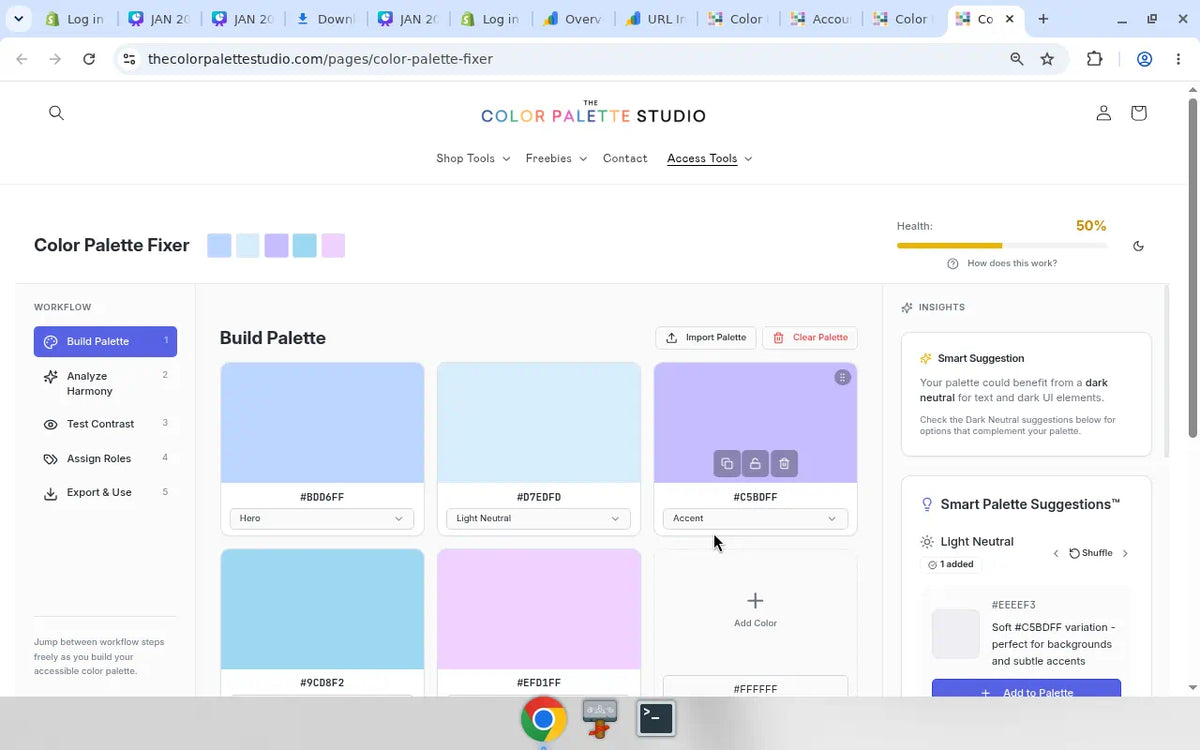
Here's a real pass from the Fixer, using that soft purple and pink starter set (#BDD6FF hero, #D7EDFD, #C5BDFF, #9CD8F2, #EFD1FF). Health sat at 50%. Harmony said "Perfect harmony! All colors work well together." Contrast said 0 of 5 colors have a 4.5 pair. The quick fix was a dark neutral (#514794) so type can actually sit on those pastels.


Pretty and unreadable is the usual problem. A generator will just hand you another pretty row. The Fixer names the missing piece.
The Fixer runs a harmony scan, a contrast test, and a balance check. It shows what's off and how to fix it. Smart Palette Suggestions can add light neutrals, dark neutrals, and harmony colors. Most people finish a pass in about 60 seconds.
Four steps:
- Build. Drop in the colors you already have (or pick new ones).
- Harmonize. Spot the troublemakers and apply one-click fixes.
- Test. Check contrast so you know which pairs people can read.
- Assign roles. Hero, accent, neutral. Now it's a system, not a mood board.
Tinted neutrals are the oat-milk and chocolate versions of a color you already love, not random gray. Get a 4.5 on the pairs that carry type.
There's a 30-day money-back guarantee. If it's not for you, email us here and we'll refund you. No hard feelings.
A simple comparison
| Coolors | Adobe Color | Color Palette Fixer | |
|---|---|---|---|
| The job | Start from scratch or a vibe | Wheel + harmony formulas | Fix the palette you already have |
| How it thinks | Random generate (spacebar + lock) | Formulas + extract from image | Diagnose, then one-click fixes |
| Contrast | Yes (Pro adds more) | Yes, plus color-blindness tools | Yes, in the same flow |
| Price | Free + Pro, about $3 to $5 / mo | Free with an Adobe account | $67 one time |
| Who it's for | New palettes, mood boards | People already in Adobe apps | Existing brand colors that feel off |
All three can check contrast in some form. Contrast is a pair of colors, not a vibe. 4.5 is the number to remember for body text.
When to use which
Coolors: no palette yet, or you want to hunt a feeling. Spacebar, lock, export. Image extract and the visualizer are bonuses.
Adobe Color: named harmony formulas, a color wheel, image extract, and color-blindness tools. Especially if Adobe Photoshop or Adobe Illustrator is already open.
Color Palette Fixer: the colors already exist. Client brand. Your brand. A Pinterest row you almost love. Something feels off and you don't want to start over.
Free Color Contrast Checker: you only need to know if one text-and-background pair hits 4.5. That's a pair test, not a full palette fix.
You can use them together. Generate a starting point in Coolors or Adobe Color. Drop those hexes into the Fixer to balance, test, and assign roles. A generator invents. A fixer finishes.
Get the Fixer
If your colors are already chosen and they're not behaving, that's the moment. One-time purchase. About 60 seconds for a first pass.
Get Color Palette Fixer ($67, one time)
Want the written method with no tool required? How to Fix a Color Palette.
FAQ
What's the difference between Coolors and Color Palette Fixer?
Coolors generates a new palette. Color Palette Fixer diagnoses the palette you already have, flags what's off, and helps you repair it, test contrast, and assign hero, accent, and neutral roles.
Does Coolors fix a brand palette?
Not really. You can lock a color and keep rolling, but Coolors isn't trying to tell you why your existing brand colors feel off, or how to keep the sacred one while you repair the rest.
Is Adobe Color the same as Fixer?
No. Adobe Color is a color wheel plus harmony formulas, image extract, and accessibility tools. Great for building and exploring. Color Palette Fixer is built to drop in colors you already have and fix them.
Is there a free Fixer?
No. Color Palette Fixer is $67 one time. For a free check, use the Color Contrast Checker. That tells you whether a text and background pair passes 4.5. It doesn't fix the whole palette.
Can I use Coolors and Fixer together?
Yes. Use Coolors (or Adobe Color) for a starting point. Then put those colors into Color Palette Fixer to balance them, test contrast, add tinted neutrals if you're missing them, and assign roles.
Coolors is a trademark of Coolors s.r.l. Adobe, Adobe Color, Adobe Photoshop, and Adobe Illustrator are trademarks of Adobe. This is an independent comparison. The Color Palette Studio is not affiliated with, endorsed by, or sponsored by Coolors or Adobe. Prices and features were checked against public pages on August 28, 2026, and can change.
GET THE BEST-SELLING TOOL

FREEBIES
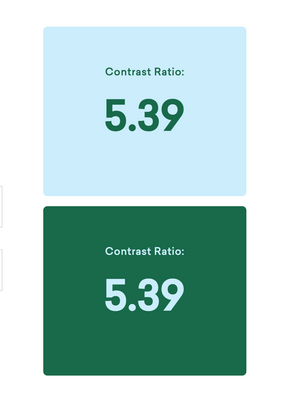
Free Color Contrast Checker
Test your brand colors for website accessibility in 10 seconds 🎨